How to Organize Links on a Bio Page: A 7-Step Order
To organize links on a bio page, choose one primary action, remove anything that no longer earns its place, group the remaining links by visitor intent, and order each group from the most useful next step to the least urgent . Use specific button labels, keep social profiles separate from task-based links, and test the finished order on a phone.
A dependable default order is:
- your identity and one-sentence promise;
- one primary link;
- two or three links that directly support that goal;
- a small group for content, services, products, or practical information;
- contact options, when needed; and
- social icons at the bottom.
That is a starting structure, not a universal quota. A newsletter launch and a restaurant page need different destinations. What they share is hierarchy: a visitor should understand what matters first without reading every button.
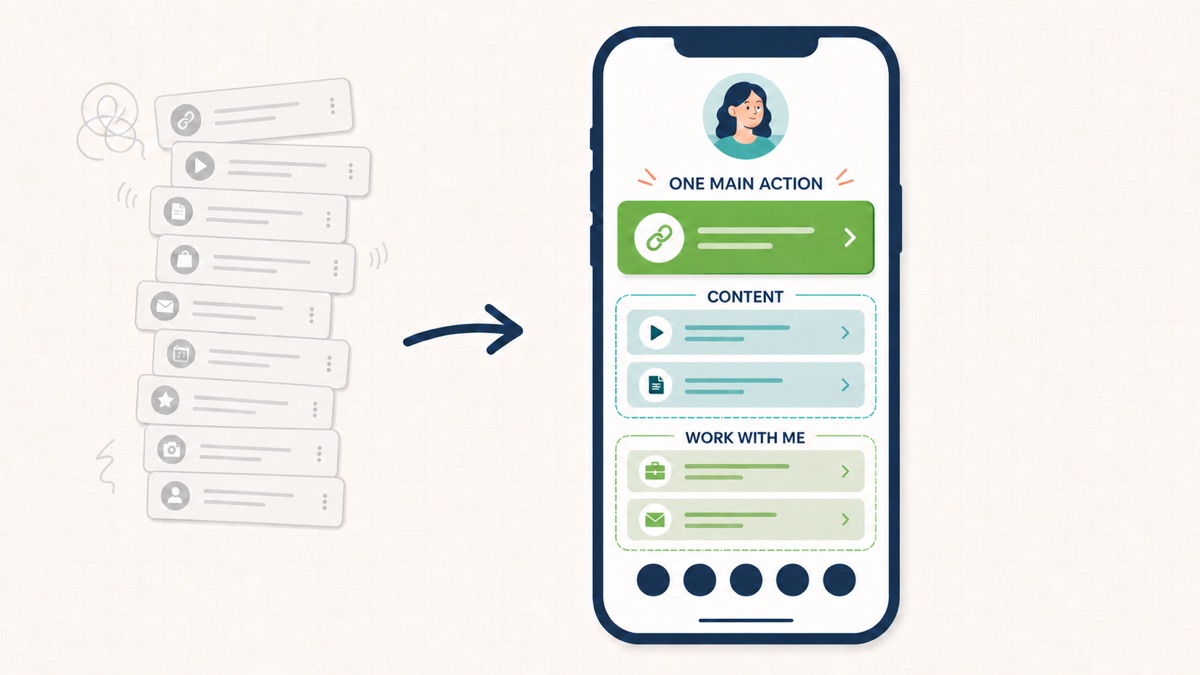
The seven-step system for organizing bio page links
Do this work with the destinations in front of you, not from memory. Open the current page, list every live link in a note, and include links that are temporarily hidden. The audit is usually easier when the labels, URLs, and purpose of each destination are visible in one place.
1. Define the page's main job
Finish this sentence: “After the right person visits this page, I want them to ____.”
The blank might be “book an introductory call,” “join the newsletter,” “reserve a table,” “watch the latest tutorial,” or “buy the new collection.” Pick one result for the page's current season. If you cannot choose between three unrelated results, the page is trying to serve audiences with different needs.
Your main job determines the first link. It also gives you a test for every supporting link: does this destination help a visitor take the main action, answer a necessary question, or provide a credible secondary route?
Suppose a portrait photographer is filling autumn sessions. “Check autumn availability” deserves the first button. A family portfolio and session guide support that choice. An old camera-review video does not, even if it once attracted a lot of views.
The main action can change. A musician might feature a new release this month and tour dates next month. Hierarchy should follow the current visitor promise, not the order in which the links were created.
2. Sort every link into keep, hide, combine, or remove
Audit each destination with four decisions:
- Keep: the link is current, distinct, and useful to the audience arriving now.
- Hide: it will matter again, but it distracts from the present campaign.
- Combine: two buttons send people toward the same outcome and one clearer destination can replace them.
- Remove: the link is expired, broken, duplicated, off-topic, or too vague to justify space.
Hiding is useful for seasonal pages because it preserves setup work without asking current visitors to navigate an expired offer. Combining is useful when the page contains “Services,” “Work with me,” and “Book a call,” but all three lead into the same enquiry journey.
Do not remove a destination merely to reach a magic link count. The question is whether each option creates a genuinely different and useful path. Our companion answer on how many links a bio page should have explains why a focused campaign and a creator hub can need different totals.
3. Group links by what the visitor wants to do
Categories should reflect the visitor's task, not your internal filing system. “Watch,” “Shop,” “Book,” “Visit,” and “Contact” are easier to interpret than “Other,” “Resources,” or “More.”
A video educator might use this sequence:
- Start here: free lesson, beginner guide;
- Learn more: current course, newsletter;
- Watch: latest tutorial, full video library;
- Work with me: workshop request, speaking enquiry.
A restaurant might use:
- Plan a visit: reserve a table, menu, directions;
- Order: pickup, delivery;
- What's happening: weekend event, private dining;
- Follow: social profiles.
If your bio tool does not display section headings, the grouping can still be expressed through order, concise labels, and restraint. Keep related buttons adjacent. Do not place a podcast episode between two booking actions or scatter contact methods throughout the page.
The difference between a grouping system and a page layout is useful here. This guide decides which links belong together and what order they should follow. The guide to four practical link in bio layouts helps you choose the larger page structure around those groups.
4. Put links in decision order, not popularity order
Within each group, arrange links according to the decision a new visitor needs to make.
For a consultant, “See how I help” may need to come before “Book a call” because a first-time visitor needs context. For an established creator promoting a well-explained workshop, “Reserve a place” can lead because the social post already supplied the context. The right order depends on what the visitor knows when they arrive.
Use this three-part test:
- Relevance: does the link match the promise that brought the visitor here?
- Readiness: can the visitor reasonably take this action now, or do they need proof or explanation first?
- Freshness: is this still the page, offer, or piece of content you want to feature?
Popularity is supporting evidence, not an automatic rule. A historically popular video may remain useful but belong below a current registration link. A low-click directions link may be essential for the smaller group of people already planning a visit.
5. Replace vague labels with destination-and-outcome labels
A visitor should know what a tap will open. Labels such as “Click here,” “Learn more,” “Website,” and “My link” force the visitor to guess.
Use a verb plus a specific destination or outcome:
| Vague label | Clearer label |
|---|---|
| Learn more | See family photography packages |
| Website | Browse the ceramic shop |
| Click here | Download the lighting checklist |
| Book now | Book a 20-minute consultation |
| Latest | Watch the latest studio tour |
Clear does not mean long. “View the menu” can be enough when the context is a restaurant. “Reserve a table for tonight” is useful when the destination opens same-day availability. Match the promise to the landing page; do not label a general homepage as if it opens a specific product.
This is also an accessibility decision. W3C's WCAG guidance on link purpose in context says people should be able to determine what a link will do from its text or its programmatically related context. Descriptive link names are especially useful when assistive technology presents links as a separate list.
If button wording is the weak point, use the examples in writing better calls to action for bio pages after the order is settled. A clever label cannot rescue the wrong destination, but a precise label can make the right destination easier to choose.
6. Separate task links, social profiles, and contact routes
Not every destination deserves the same type of control.
Use full-width, descriptive buttons for tasks that need words: downloading a guide, viewing services, joining a waitlist, booking, shopping, or reading a particular article. Use recognizable social icons for a straightforward profile destination when the icon is clear and the platform itself is the point.
Contact routes need context. A service business may benefit from “Email about a project” or “Request a property viewing.” A personal email address placed beside unrelated content links can feel abrupt, while a labeled contact action near services creates a coherent next step.
Avoid duplicating the same social destination as both a large button and an icon unless the channel is the current feature. Duplication makes the page look longer without creating another choice.
In Belink, regular links can be reordered and switched on or off, while social icons remain a distinct part of the profile. Use the live preview to judge the whole sequence at phone width rather than assuming the dashboard list will feel the same to a visitor.
7. Test the order on a phone and with real labels
Preview the actual page at a narrow width. Demo labels such as “Link one” hide problems that appear when “Download the 2026 wedding package guide” wraps onto two lines.
Run this quick test:
- Cover everything below the first screen. Can you still identify the person or business and the main action?
- Read only the button labels from top to bottom. Do they tell a coherent story?
- Tap every destination. Does the landing page fulfill the exact promise?
- Check long labels, image crops, and spacing at a small width.
- Navigate by keyboard if possible and confirm focus remains visible.
- Ask whether adjacent controls are comfortable to tap without hitting the wrong one.
WCAG 2.2's Target Size (Minimum) explanation uses a 24 by 24 CSS-pixel minimum area for pointer targets at Level AA, with specific spacing and other exceptions. Treat that as an accessibility requirement to understand, not as a complete mobile design recipe. Large full-width buttons still need readable text, separation, and an obvious purpose.
When visible groups use headings, those labels should describe the topic or purpose. That follows W3C's guidance on descriptive headings and labels and makes the page easier to orient within, especially when the structure is presented differently by assistive technology.
Three worked link-order examples
The framework becomes more useful when applied to a real page. These examples show the reasoning, not templates to copy blindly.
Creator promoting a new video series
Main job: move interested viewers into the new series and then into an owned audience.
- Watch episode one
- Get the episode worksheet
- Join the weekly email
- Browse the full video library
- Shop creator tools
- Social icons
The new series leads because it matches the current profile promise. The worksheet supports that experience. The email signup follows while interest is high. The archive and shop remain available but do not interrupt the first path.
Consultant seeking qualified enquiries
Main job: help a suitable prospect understand the offer and book a conversation.
- See the two consulting packages
- Read a relevant client case study
- Book a 20-minute fit call
- Download the project brief
- Email about an existing project
- LinkedIn profile icon
This page does not lead with an unexplained calendar. The packages and proof answer the questions a new prospect is likely to have. The booking link appears as soon as the visitor has enough context to use it well.
Restaurant balancing reservations and practical details
Main job: help nearby guests plan a visit.
- Reserve a table
- View today's menu
- Get directions
- Order pickup
- Ask about private dining
- See this weekend's event
- Social icons
Directions rank highly because they are part of completing the visit, not because they are promotional. A private-dining enquiry is valuable but applies to fewer visitors, so it stays below everyday actions.
What to do when the page still has too many links
If every destination seems important, the problem may be audience scope rather than formatting.
First, combine duplicate paths. One useful services page can replace separate buttons for every small variation when that destination lets visitors compare clearly. Second, move archive material behind a curated hub: feature the newest or best starting point on the bio page, then let the content library handle browsing. Third, consider separate campaign pages only when the audiences or promises are genuinely different.
Do not create extra pages merely to hide clutter. Each additional page creates maintenance work and another chance for expired information. A simpler page works when it removes needless decisions, not when it buries the same mess one tap deeper. The analysis in why simple bio pages work better is a useful companion when deciding what no longer belongs.
A monthly five-minute maintenance routine
A clear page can drift back into disorder after launches, new episodes, and urgent requests. Put a short recurring review on the calendar:
- tap every live link;
- remove or hide expired campaigns;
- confirm the first link matches the current profile promise;
- update labels that say “latest” when they no longer are;
- review whether two links now serve the same purpose;
- check the phone preview; and
- note clicks as evidence, without assuming the most-clicked link must always lead.
Keep a small change log if the page supports an active business. Recording “workshop moved to first position on August 23” makes later click patterns easier to interpret than making several silent changes at once.
Bio page organization checklist
Before publishing, confirm that:
- one main action is visually and editorially obvious;
- every live link is current and reaches the promised destination;
- related links sit next to each other;
- groups are named for visitor tasks, when headings are available;
- buttons use specific destination-and-outcome labels;
- social icons do not duplicate large buttons without a reason;
- expired campaigns are hidden or removed;
- the page remains readable and easy to tap on a phone; and
- the order still makes sense to someone arriving for the first time.
Frequently asked questions
What link should go first on a bio page?
Put the link that best matches the current visitor promise and the page's main job first. That may be a booking page, a specific product, the latest release, a newsletter, or a practical action such as reservations. Do not default to a general homepage when a more specific destination fulfills the promise better.
Should social media links go at the top or bottom?
Usually place social icons after the task-based links because the visitor has already arrived from a profile or channel. Move a social destination higher when following that particular channel is the main goal, or when it contains the specific content promised before the visit.
How should I organize links for two different audiences?
Use two clearly named groups if the audiences share the same identity and only need different routes, such as “For clients” and “For students.” Consider separate campaign pages when the promises, language, and next actions barely overlap. Avoid mixing both paths into one alternating list.
How often should I reorder bio links?
Change the order when the campaign, visitor intent, or destination freshness changes—not on an arbitrary weekly schedule. Review the page monthly and after launches or expired events. When you make a change, give it enough time to observe unless a broken or misleading link needs immediate correction.
Make the next action obvious
Good organization is not about making every link equally visible. It is about helping the right visitor take a useful next step while keeping credible alternatives within reach.
Start with the page's job, make one action primary, group the rest by visitor intent, and read the labels in order on a phone. If the sequence sounds like a helpful guide instead of a storage drawer, the structure is doing its job.
You can build a Belink page and reorder the links in its live preview while you work through the seven steps.
Accessibility references reviewed August 23, 2026.