
Belink vs Carrd: Link Page or One-Page Landing Site?
Choose Belink when your social profile needs a short, regularly updated route to destinations you already maintain. Choose Carrd when the page itself must explain an offer through a custom one-page layout. Both can support a bio link; the useful comparison is how much information belongs on that first page and who will maintain it.
This comparison is published by Belink. Product descriptions were checked against the live services on October 18, 2026. The examples below are illustrative, not customer results.
Start with the content you already have
Before opening an editor, list the places a visitor might need: a shop, appointment calendar, portfolio, newsletter signup, latest release, or contact page. Then mark which destinations already explain the offer properly.
If those pages are complete, a concise hub can help people choose among them. If the explanation is missing everywhere, a row of buttons will not supply it. You need to write the offer, show relevant work, answer practical questions, and provide a clear next action.
That distinction makes a Belink-versus-Carrd decision more useful than counting templates. A beautiful page still fails if the visitor cannot understand what happens next.
What Belink and Carrd actually offer
Belink is a link in bio service for organizing destinations behind one public profile URL. Its live product page lists unlimited links, themes, click analytics, video embeds, downloadable documents, and a custom username. Those capabilities suit a maintained social front door.
Carrd describes its product as a builder for responsive one-page sites, starting from templates or a blank page. You can use that canvas for a personal profile, a portfolio introduction, or an offer landing page.
Carrd's official Pro plan comparison lists custom domains, forms, widgets, embeds, and analytics among paid capabilities, with availability depending on the tier. Check the specific plan before assuming that a feature belongs to every paid option.
These are starting points, not restrictions on creativity. You can build a compact link list in Carrd, and a Belink page can include supporting media. The decision is where the visitor should read, choose, and act.
A practical comparison by publishing job
| Publishing job | Belink approach | Carrd approach |
|---|---|---|
| Keep several established destinations accessible | Organize the current routes on a profile page | Build a one-page layout containing the routes |
| Explain a new offer before the next action | Use concise context and send visitors to the full explanation | Compose the explanation and call to action within one page |
| Maintain a changing social front door | Review labels, destinations, and priority order | Review links plus any surrounding offer sections |
| Match a particular visual narrative | Start with the profile-page presentation | Start with a one-page canvas and its layout decisions |
| Evaluate ongoing cost | Check Belink's trial and one-time publishing terms | Check Carrd's free limits and the relevant Pro renewal tier |
The table describes workable approaches, not a measured speed test. How quickly either option works depends on your content, design choices, and familiarity with the editor.
One fictional workshop, two sensible pages
Imagine a ceramics teacher promoting weekend workshops. Booking, class descriptions, accessibility information, and cancellation terms already live on a booking website.
A Belink page could prioritize “See weekend workshop dates,” followed by “View student work” and “Ask about private groups.” Each label should open the specific destination that fulfills it. The bio page does not need to repeat every class description.
Now imagine the teacher has a booking link but no page explaining the workshop. A Carrd landing page could introduce the session, show the learning outcome, describe who it suits, explain what materials are included, and then send readers to booking. That is a writing and layout task as well as a linking task.
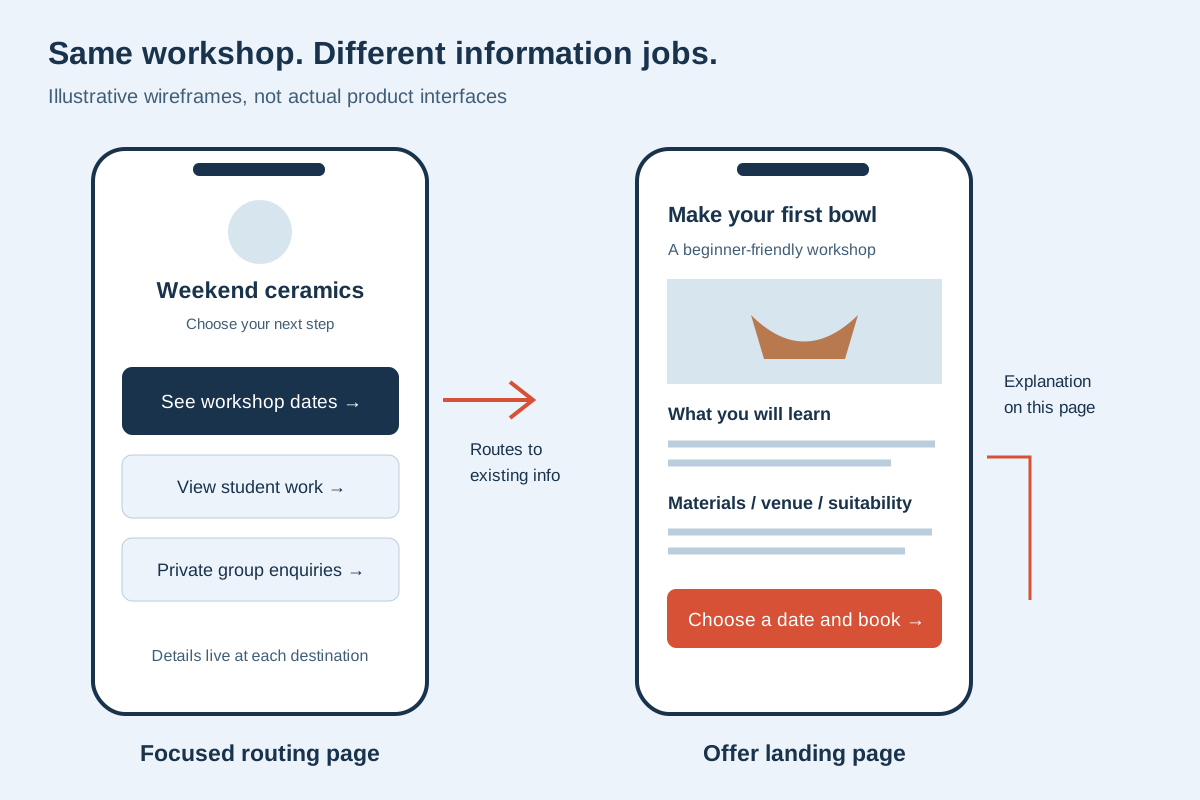
Illustrative layouts: the left page routes people to existing information; the right page supplies an explanation before booking. These are not product screenshots.
Neither page should hide essential details behind vague labels. If people must know the venue, skill level, or refund terms before paying, make that information easy to reach. The right structure follows the customer's decision.
For the broader question of when multiple pages become useful, read link in bio versus a website . Carrd's one-page format should not be treated as equivalent to an entire multipage content strategy.
Compare the work after launch
A link page needs editorial ownership. Someone must retire expired offers, check destination access, and keep the top action aligned with current posts. “Simple” describes the presentation, not an exemption from maintenance.
A landing page also needs an owner for its surrounding explanation. A changed workshop date may affect the headline, schedule, booking button, image caption, and FAQ. Copying the same fact into several places creates several opportunities for disagreement.
Write down the authoritative source for each fact. Keep booking availability in the booking system. Keep durable policies in their maintained destination. Only repeat information on the landing page when it helps the visitor and you can keep it accurate.
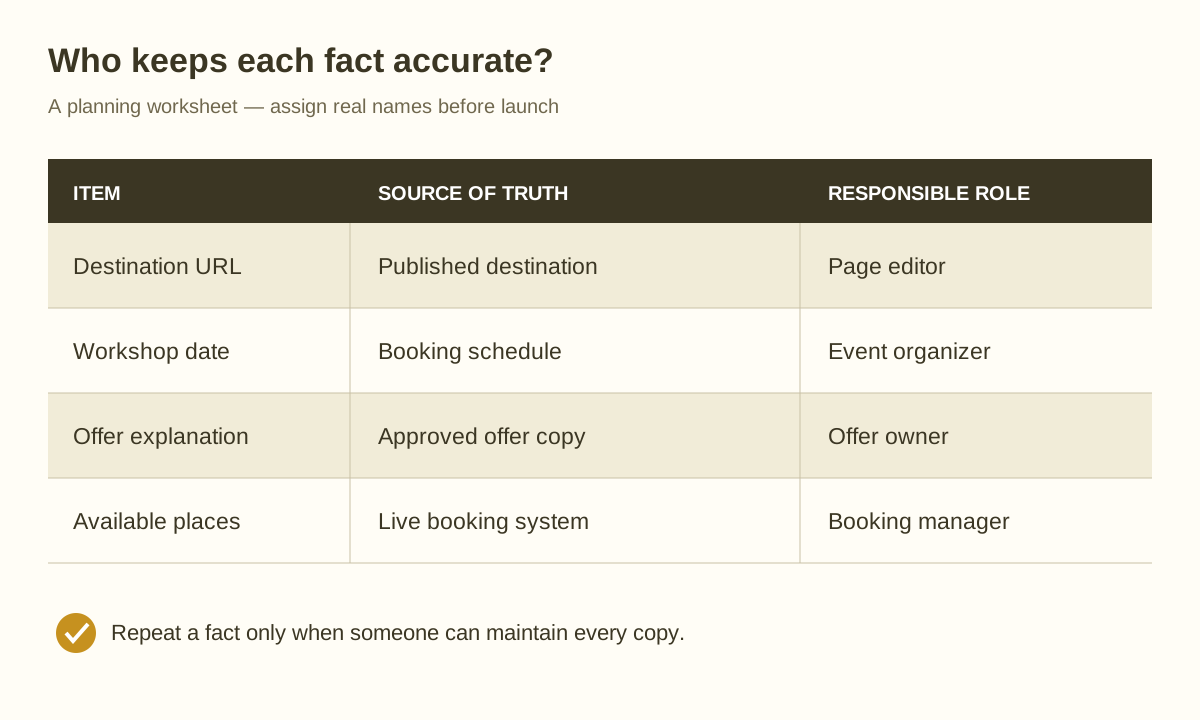
Use this ledger before launch: every repeated fact needs an owner, and every route needs a verified destination.
If the short page starts expanding, use the seven-step link organization guide to separate primary actions from supporting information. Adding another button should solve a real visitor need.
Test both options with the same content
A fair trial uses the same business name, short introduction, primary action, supporting links, and available images. Comparing a polished design with an unfinished draft mostly measures preparation.
First, ask someone unfamiliar with the offer to describe the page's purpose. Then ask them to find a specific task, such as booking a beginner session or checking whether materials are included. Watch where they hesitate.
Record the cause: unclear wording, missing information, competing actions, a broken destination, or excessive scrolling. Fix that cause before changing platforms. No builder can rescue a destination that requires an unexpected login or a booking page with outdated dates.
Test from the actual social app on a phone and while signed out. Desktop preview is useful, but it cannot show every handoff in the visitor's journey. The bio-page launch checklist covers the practical checks.
Understand the publishing terms before committing
Belink's live pricing distinguishes a 30-day public trial from one-time lifetime publishing. It also explains what happens after an unpaid trial. Read the current publishing terms before placing the URL on permanent printed material.
Carrd offers a free starting option and annual Pro tiers. Its official pages describe up to three free sites, while the Pro comparison separates plans by features and site allowances. Choose the tier that covers your actual requirements, including any domain, form, or embed needs.
Include domain registration and connected services in your own budget where applicable. A page-builder plan is not automatically the entire cost of a newsletter, payment service, booking tool, or domain. There is no need to buy capabilities that your existing destinations already provide.
Frequently asked questions
Can Carrd work as a link-in-bio page?
Yes. A responsive one-page site can contain a short introduction and links to other destinations. Keep the layout focused if the job is routing; a flexible canvas does not require a long page.
Does choosing Belink mean replacing my existing website?
No. You can keep the website as the detailed source and use the bio page to direct social visitors to the relevant section. Avoid making every button lead to the same generic homepage.
Which option is better for a new service launch?
Use Carrd if your immediate task is creating the missing offer explanation on one page. Consider Belink if the offer already has a good destination and your profile must organize it alongside other active routes. Judge the complete visitor path.
Will either tool guarantee more traffic or enquiries?
No. A page can make the next step clearer, but results also depend on audience relevance, the offer, destination quality, and ongoing upkeep. Treat analytics as evidence to investigate rather than proof that one layout caused an outcome.
Choose the page you can keep accurate
Write one sentence describing the visitor's task, identify where the necessary explanation belongs, and name the person responsible for updates. If the work is curating current routes, start with Belink. If the work is composing a one-page explanation, test Carrd. Publish the smallest complete journey, then improve it from observed visitor questions.