Link in Bio for Authors: Books, Buy Links, Newsletter, and Events
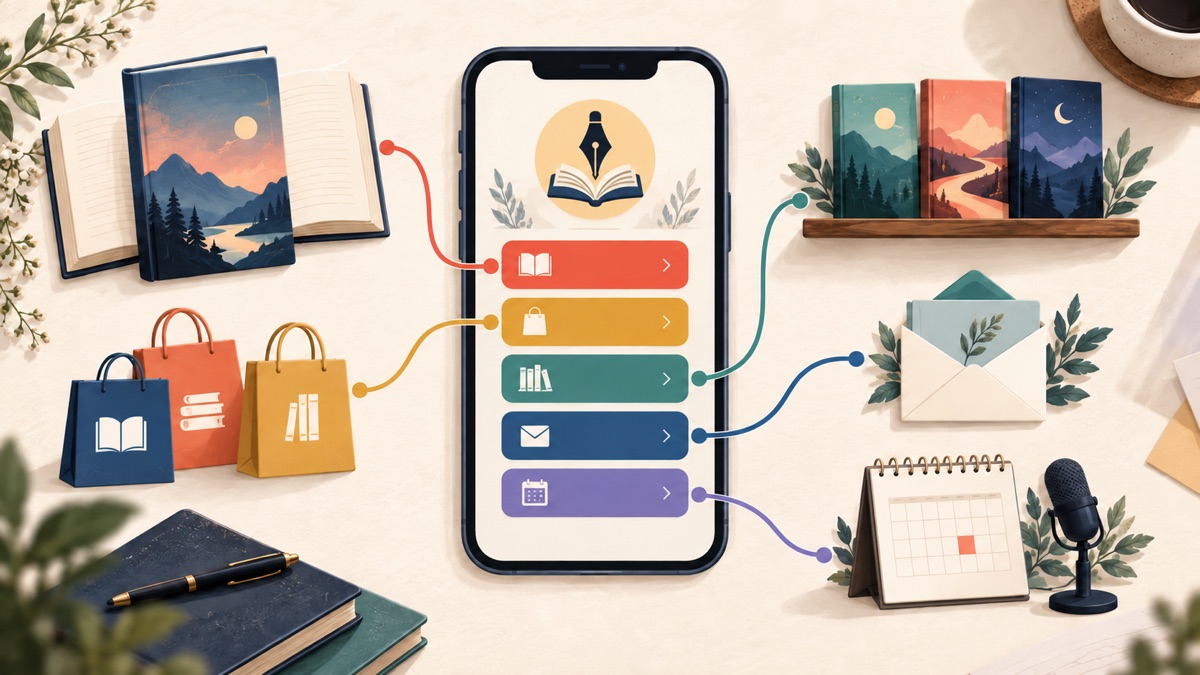
An author link in bio page should help a reader choose a useful next step without making them understand your entire publishing business first. Put the book or reader action promised by your current post at the top, provide a practical way to choose where to buy or read it, keep series order clear, and place your newsletter, events, and professional contact paths underneath.
For most authors, this is a useful default order:
- author name, recognizable photo or mark, and a one-line description of what you write;
- the book, pre-order, sample, or event featured in your current posts;
- retailer or format choices for that featured title;
- series reading order or a short path into the backlist;
- a newsletter signup with a specific reader benefit;
- current appearances, signed editions, media, or rights enquiries; and
- your website and active social profiles.
The first item should change with the campaign. A pre-order announcement, a release-day excerpt, a bookstore event, and an evergreen introduction to your backlist create four different reader expectations. Your page can keep one stable URL while changing the first route to match the promise that earned the visit.
What is an author link in bio page?
An author link in bio page is a compact mobile page that connects an author's social profile to books, retailer choices, samples, a newsletter, events, and professional information. It is a routing page rather than a complete author website or a duplicate bookstore.
That distinction matters because readers arrive with different amounts of context. Someone who watched a BookTok video about book three may want the series order. Someone who heard an interview may want the nonfiction title discussed on the show. An existing reader may be looking for a release announcement, while a librarian or journalist may need an event or press contact.
A useful page recognizes those paths but does not give every path equal visual weight. It answers the visitor's most likely question first, then offers a few durable routes that remain helpful between launches.
An author page on a retailer still has a role. Amazon says its Author Central pages can collect an author's books, biography, and follower information in one Amazon destination. That makes a claimed Amazon Author Page useful for a reader who already wants Amazon. Your bio page has a different job: it can route readers across retailers, formats, owned channels, events, and your broader website without assuming one store is right for everyone.
Choose the reader decision before choosing the links
Start with the post, video, interview, or event that sends people to the page. Finish this sentence:
A reader arriving from this promotion should first __ .
Good answers are concrete: “read the opening chapter,” “pre-order the new novel,” “find book one,” “reserve a signing place,” or “join the monthly research note.” “Explore my work” is usually too broad to establish a first button.
This decision keeps the page from becoming a pile of publishing accounts. A link to every retailer, every book, every interview, every social network, and every old giveaway may look comprehensive to its owner. To a first-time reader on a phone, it looks like unfinished navigation.
When several links seem equally important, use the seven-step system for organizing a bio page to sort them by visitor intent, campaign relevance, and maintenance cost. The point is not to hide your body of work. It is to create a clear entrance to it.
The best link in bio order for authors
The following order works for many novelists, nonfiction authors, poets, illustrators, and independent publishers. Treat it as a decision framework, not a mandatory template. An author with one book needs a different page from a novelist with four interconnected series.
1. Confirm the author and the kind of reading
The top of the page should reassure a visitor that they found the right person. Use the author or pen name that appears on the relevant book, a recognizable image, and one sentence that names the genre, subject, or reader promise.
“Coastal mysteries about families with expensive secrets” is more useful than “Author, dreamer, coffee lover.” A nonfiction author might use “Practical field guides for first-time nonprofit directors.” A poet could name the themes or forms a new reader will encounter. Personality can appear in the voice, but it should not displace the information that helps someone decide whether the work is for them.
If you publish under several pen names, do not quietly mix unrelated catalogs on one page. Either make the distinction explicit or use separate pages when the audiences and promises are genuinely different. A reader looking for children's books should not need to decode which thriller links belong to another name.
2. Feature one book or one reader action
Put the current promise immediately below the identity block. During a launch, that is often the new title. Between launches, it might be a strong starting book, a complete-series page, or a sample that gives a new reader enough experience to choose.
The button should name both the item and the action:
- “Read the first chapter of Salt Lines ”
- “Pre-order The Orchard Map ”
- “Start the Harbor Street mysteries”
- “Get tickets for the Sept. 24 reading”
- “See the illustrated field guide”
Avoid using “Buy my book” as the only context. It does not tell a visitor which book, edition, or destination will open. If the social post quotes a specific title, repeat that title on the page so the journey feels continuous.
Apple Books for Authors recommends sending an interested reader to a single destination page with localized purchase options, and its current social-promotion guidance points authors to a partner tool for creating that kind of route. The broader principle applies regardless of provider: make the next choice coherent, and test the exact destination before sharing it.
3. Give readers a sensible retailer or format choice
Readers may prefer a particular retailer, local store, library service, audiobook platform, or format. Do not assume that one store button serves everyone, but do not place ten equal retailer buttons on the first screen either.
Three patterns are practical:
| Pattern | Use it when | Check before publishing |
|---|---|---|
| One direct retailer link | The post names that retailer, edition, or promotion | The title, territory, format, and availability are correct |
| Two or three named choices | Your audience is concentrated among a few known destinations | Each label opens the expected edition rather than a search page |
| One multi-retailer page | The same title is available across several stores or regions | The intermediate page is current, understandable, and comfortable on mobile |
A universal destination adds another step, so it should earn that step by solving a real choice. A direct link may be better for a retailer-specific promotion. A multi-retailer route may be better for an international audience or a post that never mentioned a store.
Label formats when they matter. “Listen to the audiobook,” “Order the paperback,” and “Request it from your library” describe different outcomes. “Get the book” hides those distinctions and may send someone to an edition they did not expect.
If a purchase link earns you an affiliate commission, make the relationship clear where a reader can connect the disclosure to the link. The US Federal Trade Commission's current affiliate disclosure guidance says the relationship should be disclosed clearly and conspicuously, and that a “buy now” label alone does not communicate it. Authors should also check the requirements that apply to their location, retailer program, publisher, and audience.
4. Make series order impossible to misunderstand
A social post can introduce a reader to the middle of a series. If order matters, give that reader a visible route to book one or to a short reading-order page.
Use plain labels such as:
- “Start the trilogy with A Door of Ash ”
- “See the Gray Harbor reading order”
- “These romances can be read in any order”
- “Begin the essays with the free introduction”
Do not list twelve covers without explaining their relationship. A chronological list, grouped series page, or single “Choose your next book” destination usually works better than a separate full-width button for every title.
Be precise about standalones, connected worlds, novellas, and optional prequels. “Book zero” may make sense inside an author's catalog but confuse a new reader. If a novella is optional, say so. If the books can be read independently, say that instead of manufacturing urgency around an order that does not matter.
5. Offer one durable relationship beyond the sale
A newsletter can keep the page useful between releases, but “Join my newsletter” is not a complete offer. Tell the reader what will arrive and, if you can sustain it, how often.
Examples include “Get a monthly mystery and research note,” “Receive new-release and signing updates,” or “Read a free prequel, then occasional book news.” Only promise the sample, cadence, or early access that your actual email process delivers.
Send the button to a signup page that explains the exchange. If a reader receives a sample, identify the format and delivery method. If the list includes promotional messages, do not disguise it as access to a one-time file. Consent language, confirmation, privacy information, and unsubscribing belong in the email system or website that completes the signup.
The newsletter does not always belong above the featured book. Move it higher when list growth is the campaign—for example, during a cover reveal with an email-first announcement. Keep it below the reading action when the post promised a chapter or purchase link.
6. Separate reader events from professional enquiries
An appearance serves a reader. A rights request, school visit, speaking enquiry, or media interview serves a professional visitor. They can coexist on one page, but the labels should make the audience obvious.
For readers, use specific event actions: “Reserve a place — Bristol, Oct. 12,” “See upcoming library talks,” or “Order a signed copy from Riverbend Books.” Remove expired events promptly. An empty events page or last year's ticket link erodes trust faster than no event button.
For professional visitors, a lower group can include:
- press kit or approved author biography;
- media and podcast enquiries;
- speaking, school, or book-club visits;
- literary-agent or rights information; and
- a contact route with a clear purpose.
Do not expose a private email address merely because contact feels expected. A maintained form or a public business address may be more appropriate. If your publisher, agent, or publicist handles a request, route it to the person responsible rather than collecting messages you will forward later.
7. Keep the website and social profiles in supporting roles
Your author website can hold long biographies, searchable archives, educator resources, press coverage, detailed event pages, and evergreen search content. The bio page should route a visitor to the relevant part of that site rather than reproducing its entire navigation.
If you are deciding whether you need both, the practical difference is covered in our guide to link in bio pages versus websites . In short, the bio page handles a quick social-profile decision; the website supplies depth. One does not automatically replace the other.
Place active social profiles in a compact lower group unless following another channel is the current campaign. A row of recognizable social icons is often enough. Full-width buttons should be reserved for destinations whose purpose needs words.
Change the page across a book's campaign cycle
A stable bio URL does not require a frozen page. Keep the author identity, newsletter, and durable catalog routes in place while changing the lead action as the book moves through its campaign.
Before pre-orders open
Lead with an announcement, cover reveal, sample, or newsletter route only if it gives the reader something real to do. Do not use “Pre-order now” before the destination accepts orders. If a release date is not firm, avoid copying an uncertain date into multiple buttons that will all need correction.
During the pre-order period
Feature the exact title and a retailer-choice route. Test every listed market and format you actively promote. Keep an existing book or free sample nearby so a new reader can experience your work now rather than facing only a future transaction.
On release week
Replace pre-order language with accurate purchase, reading, or listening language. Check that old campaign links did not preserve stale dates or editions. A launch event can lead for posts about that event; the book should lead for excerpts, reviews, or availability announcements.
Between releases
Choose an intentional starting point. That may be book one, a complete series, a reader favorite, a topical nonfiction title, or a useful sample. Retain the newsletter and current events. Archive giveaways that ended and remove claims such as “new release” when they no longer help a first-time visitor.
This pattern is a version of the creator-hub layout : one current item leads, durable audience and commercial routes support it, and social channels sit below the decisions that require explanation.
Four complete author link in bio examples
These are page-order examples, not claims about sales or conversion. Replace every fictional detail with your real titles, availability, and reader offer.
Debut novelist opening pre-orders
Reader goal: understand the novel and choose a buying option without encountering an empty backlist.
- “Read the first chapter of The Map Room ”
- “Pre-order The Map Room — choose a bookstore”
- “Get release notes and event invitations”
- “Meet the author”
- “Media and book-club enquiries”
- Social icons
The sample leads because the author is new to most visitors. The retailer route is close behind, while the newsletter offers a durable next step. There is no artificial “Books” section containing one repeated title.
Series novelist promoting book four
Reader goal: serve current readers without confusing people who discovered the series through the new cover.
- “Pre-order The Fourth Lantern ”
- “New here? Start with The First Lantern ”
- “See the Lantern District reading order”
- “Get the bonus epilogue and book news”
- “Upcoming signings”
- Website and social icons
The latest installment can lead while the second button rescues a newcomer from buying out of sequence. The reading-order page handles the full catalog more clearly than four equally weighted purchase buttons.
Nonfiction expert after a podcast interview
Reader goal: continue the specific idea discussed in the interview, then choose between reading and professional work.
- “Read the cited decision checklist”
- “Get The Useful Meeting ”
- “Receive the monthly operations note”
- “See speaking topics”
- “Media enquiries”
- Full author website
The promised resource leads because it preserves the interview's context. Book and newsletter routes follow. Speaking and press actions remain clear without turning the reader's path into a consulting funnel.
Children's author with school visits
Reader goal: help families find the books while giving educators a separate route.
- “Meet the Willow Fox books”
- “Choose hardcover, ebook, or audiobook”
- “Download the family activity sheet”
- “Teachers: view school-visit information”
- “See public story times”
- “Contact the author team”
Audience labels matter here. Parents and educators may use the same page for different jobs, so “Teachers” reduces ambiguity. The activity sheet should state what it contains and avoid requesting personal information it does not need.
Better button copy for an author page
Useful labels name the book, format, destination, or reader outcome. They remain understandable when someone scans the page without reading every paragraph.
| Vague label | More useful author-page label |
|---|---|
| Buy now | Buy Stone Orchard — choose a retailer |
| My books | Start the Harbor Street series |
| Freebie | Read the free prequel novella |
| Newsletter | Get monthly book and event news |
| Events | See upcoming readings and signings |
| Contact | Ask about media interviews |
| Learn more | Read the research notes for chapter six |
W3C's explanation of link purpose in context says people should be able to determine a link's purpose from its text or associated context. That is especially relevant on a bio page, where much of the experience is a compact list of links.
Do not make a label more exciting by making it less accurate. “Read free” should not open a purchase page. “Signed copies” should not lead to an out-of-stock product with no explanation. “Book a school visit” should not open a generic contact form that never asks about dates or audience age.
Measure the route without calling every click a sale
A bio-page click shows that someone chose a destination. It does not prove that the person bought a book, read a sample, attended an event, subscribed, or became a client.
Use a measurement chain that respects those boundaries:
- record the campaign and date that sent visitors to the page;
- compare outbound clicks on the featured book, retailer route, series order, and newsletter;
- use retailer, ticketing, or email reporting for the action completed there when available;
- change one important variable at a time, such as the lead title or button wording; and
- keep notes on availability changes that could explain a result.
If you use campaign parameters or affiliate tokens, test the complete published URL. Confirm that it opens the expected country, book, and format and does not break a retailer app handoff. Do not treat affiliate reporting as a complete view of reader behavior across every store.
A statement such as “the paperback button received 40 clicks” describes the bio page. “The bio page sold 40 paperbacks” requires separate transaction evidence. Keeping those statements distinct leads to better editorial decisions and more credible reporting.
How many links should an author page have?
There is no correct number for every catalog. A debut author may need five visible actions. An author with several series may need grouped catalog destinations rather than dozens of book buttons. The useful limit is the number of choices a reader can understand and the author can keep accurate.
Use our link-count guide when deciding whether to show, group, or remove a destination. As a practical check, every full-width button should answer at least one of these questions:
- Does it fulfill the current post's promise?
- Does it help a new reader choose where to begin?
- Does it maintain a direct reader relationship?
- Does it serve a distinct current event or professional task?
If the answer is no, the link may belong on the full website, inside a catalog page, behind a grouped destination, or nowhere at all. Social icons and archived interviews rarely need the same weight as the featured book.
Author link in bio checklist
Before sharing the page, test it on the phone and in-app browser your audience is likely to use:
- Does the author name match the promoted book or pen name?
- Can a first-time visitor tell what kind of books you write?
- Does the first button fulfill the promise in the current post?
- Is the correct title, edition, format, and territory available at each destination?
- Can a newcomer find book one or understand the reading order?
- Are affiliate relationships disclosed clearly beside the relevant links?
- Does the newsletter explain what the reader will receive?
- Are event dates current and expired tickets removed?
- Are press, rights, speaking, and reader-contact routes labeled separately?
- Can every button be understood without relying on “click here” or an unexplained icon?
- Does the page remain readable without horizontal scrolling?
- Is there an owner and date for the next campaign update?
Open every destination instead of checking only that the button looks right. A beautifully labeled link can still lead to the wrong edition, a removed event, an expired sample, or a regional error page.
Frequently asked questions
What should an author put in their link in bio?
Start with author identity and the current featured book, sample, pre-order, or event. Then provide a clear retailer or format choice, series order or backlist route, a newsletter with a defined benefit, current appearances, and separate professional contact options. Keep social profiles at the bottom unless following a channel is the campaign.
Should an author link directly to Amazon?
It depends on the post and audience. A direct Amazon link is reasonable when the promotion names Amazon or a specific Amazon edition. A multi-retailer page is more useful when readers need store, format, or regional choice. Test the destination and disclose any affiliate relationship clearly.
Do authors still need a website?
Often, yes. A compact bio page is good at routing social visitors to one next action. A website is better for detailed biographies, press resources, teaching materials, rights information, archives, and searchable long-form content. The strongest setup may use the bio page as the mobile front door to specific website sections.
Should every book appear as a separate button?
Usually not when the catalog is large. Feature the current book, provide a clear “start here” or reading-order route, and group the backlist by series or audience. Separate buttons are useful only when each choice is understandable and current.
Where should the newsletter link go?
Place it below the featured reader action in the default layout. Move it higher when email signup is the campaign's specific goal. In either position, describe what subscribers receive instead of using “Newsletter” as the entire offer.
Give the reader one clear way into your work
An author page succeeds when it turns interest into orientation. The visitor should know which book is being discussed, where they can read or buy it, how the catalog fits together, and what relationship is available after the first visit.
Keep one stable URL, change its lead action with the campaign, and move the full archive somewhere designed to hold it. If you want to assemble that reader path now, create a Belink account , add only the destinations you can keep accurate, and preview the page on a phone before putting it in your profile.