Link in Bio for Musicians: What to Include and What Goes First
A musician link in bio page should help a fan take the next step that fits your current season: hear the featured release, choose a listening service, get show tickets, buy merchandise, join your mailing list, or contact you for a booking. Put the action promised by your latest post first, keep two or three durable fan routes underneath, and separate industry enquiries from fan actions.
For most independent artists, this is a useful default order:
- artist name, recognizable image, and one clear description;
- the current release, video, pre-save, or tour campaign;
- a small set of listening choices;
- tickets or the next confirmed show;
- merchandise or another active fan offer;
- email signup; and
- booking, press kit, and social profiles.
The exact order should change when the campaign changes. A single released today deserves a different first button from a tour that goes on sale tomorrow. Your page is not a permanent discography; it is the shortest useful path from the post that earned attention to the action a fan wants to take.
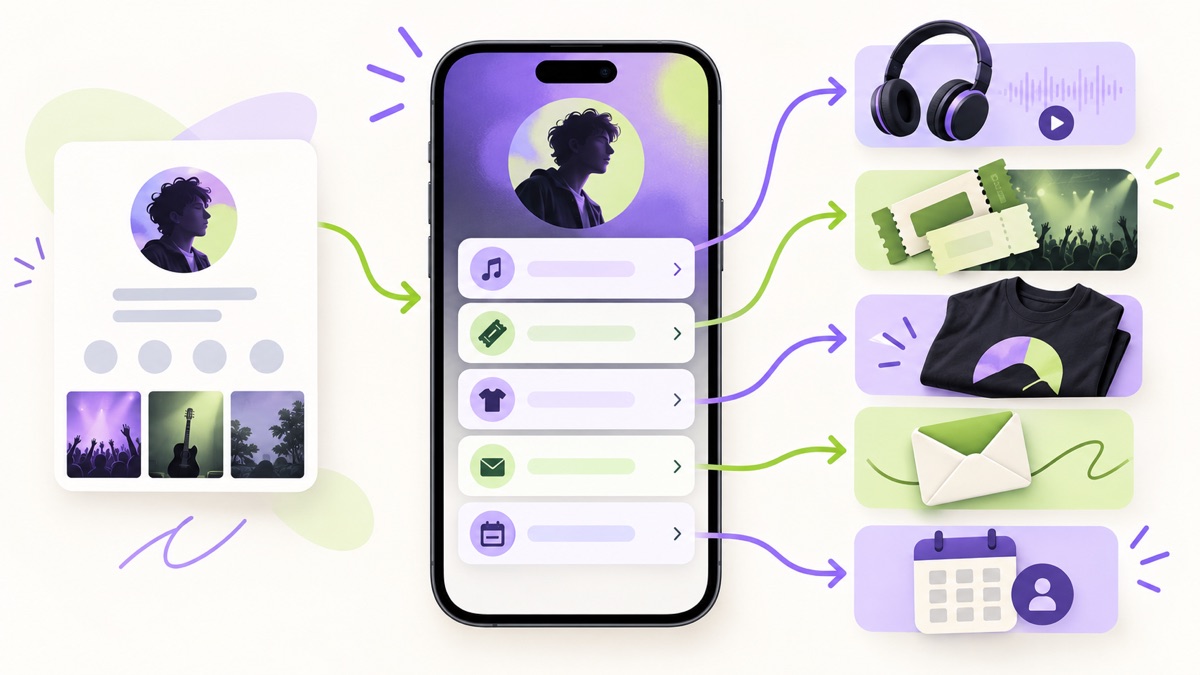
What is a musician link in bio page?
A musician link in bio page is a compact mobile page that connects one social-profile URL to the destinations an artist needs to promote. It can route listeners to a song or album, serve fans on different streaming services, surface show tickets, link to merchandise, collect email signups, and give promoters or press a clear contact path.
It is different from a streaming smart link. A smart link usually solves one release-specific task: let a listener choose where to play or pre-save a song. A broader bio page can feature that smart link while also keeping evergreen destinations such as tour dates, the store, newsletter, and booking contact available.
It is also different from a full artist website. A website is better for a large archive, detailed biography, searchable press coverage, long-form news, or several projects. The bio page is better for a quick decision from Instagram, TikTok, YouTube, or another social profile. Many working artists need both, with the bio page acting as the mobile front door and the site providing depth. Our guide to choosing between a bio page and a website explains that handoff in more detail.
Choose the page's job before choosing its links
Start with the campaign, not with a list of every place your music exists. Finish this sentence:
A person arriving from my current posts should first __ .
The answer might be “play the new single,” “pre-save the EP,” “buy a ticket in their city,” or “watch the live session.” It should name one observable action, not a vague ambition such as “become a fan.”
That decision determines the first button and the supporting information around it. A post built around a studio clip should not lead to an old merchandise collection. A show announcement should not make a visitor search past six streaming services before finding tickets. The page should preserve the promise that persuaded the person to tap.
When several campaigns compete for the first position, use the seven-step link-ordering system to keep, hide, combine, or remove each destination. Hiding an old campaign is often better than deleting it if you expect to reuse it, but expired offers should never remain above current work.
The best link in bio order for musicians
The following structure works for a solo artist, band, producer, DJ, composer, or ensemble, but each section should earn its place. An artist with no live dates does not need an empty tour button. A composer seeking commissions may need work samples and contact information above merchandise.
1. Confirm the artist's identity
The first screen should tell a visitor that they reached the right artist. Use a current photo or recognizable artwork, the exact artist name, and one short line that gives useful context.
“Dream-pop duo from Singapore — new EP out now” is more informative than “Welcome to our links.” A session guitarist might say “Guitarist and arranger available for remote sessions.” A DJ could identify the sound and current residency. The description does not need to reproduce a full biography.
Keep naming consistent with your release and ticket pages. If the project name uses punctuation, spacing, or capitalization in a particular way, use the same form here. Consistency helps a fan recognize the destination after leaving the social app.
2. Feature one current music or campaign action
The primary button should change with the artist's calendar:
- Before a release: pre-save the single or view the release announcement.
- On release day: play the new single or choose a listening service.
- During a video campaign: watch the official video or live session.
- During a ticket launch: get tickets for the announced date or view all shows.
- Between campaigns: start with the strongest introduction to the catalog.
Apple Music for Artists says its Promote tools can create links that drive to Apple Music and other music services using Linkfire technology. Apple also provides direct content links, badges, and embedded previews through its music marketing tools . These can be useful destinations, but the label on your bio page still needs to explain whether the fan will open one service, choose among services, or hear a preview.
Do not call every destination “new” or “latest.” Name the release when space allows: “Play Glass Houses,” “Pre-save the Northbound EP,” or “Watch the rooftop session.” Specific labels continue the story from the post and remain understandable when someone scans the links without reading the full bio.
3. Give listeners a practical platform choice
If the first button opens a single streaming service, place one alternative or a “Choose your music service” smart link nearby. If the primary button already opens a service chooser, do not repeat every platform as a separate full-width button underneath.
There are three reasonable patterns:
| Pattern | Use it when | Watch for |
|---|---|---|
| One featured service | Most of your audience uses the same destination and the post names it | Fans on other services still need a visible alternative |
| Two or three service buttons | Audience preferences are concentrated among a few known services | A row of logos can become hard to distinguish or tap |
| One service-choice link | You promote across many services or countries | Confirm the chooser stays current and opens the intended release |
Apple's current artist tools explicitly support a single Linkfire link for multiple services. That makes a smart link a credible option, not a reason to hide what happens after the tap. “Choose where to listen” is clearer than “Stream now” when the next page presents another decision.
Spotify's artist-profile guidance shows why a bio page does not need to duplicate an entire streaming profile. A Spotify artist profile can already contain music, an Artist Pick, merchandise, and events. Its artist-profile overview describes Artist Pick as a place to highlight a release, Countdown Page, show, merchandise item, video, playlist, or other current priority. Your bio page should route the right visitor there when that is the useful destination, then use its remaining space for actions the streaming profile does not cover well.
4. Put tickets where the announcement expects them
For an active tour or confirmed show, tickets may outrank the streaming choices. A visitor arriving from “Tickets on sale Friday” should see the relevant ticket action immediately. A visitor arriving from a clip with no show context may reasonably see the song first and “View tour dates” below it.
Choose between a specific-event button and a tour hub:
- Use “Get tickets — Shanghai, Oct 17” when one show is the campaign and the destination opens that event.
- Use “See all confirmed shows” when several dates are active and the destination can filter or list them clearly.
- Remove or hide the button when no dates are confirmed. “Tour dates” leading to an empty page wastes the fan's attention.
Check dates, city names, age restrictions, venue details, and ticket status at the destination. The bio page should not copy details you cannot keep synchronized. Its job is to set an accurate expectation and route the fan to the authoritative event page.
If you also promote events for several artists, the organizer-side workflow is different from an individual artist page. Use the event organizer link in bio guide to manage ticket states, venue details, attendee updates, and the post-event handoff across a wider calendar.
5. Treat merchandise as a campaign, not filler
Merchandise deserves a prominent button when there is something current to buy and the social content supports it. “Shop the tour shirt” or “Order the limited vinyl” gives a fan more information than “Store.” If the store contains many unrelated items, send the launch post to the featured product instead of the shop homepage.
Put practical information on the commerce destination: price, currency, variants, shipping availability, production timing, returns, and stock. Do not squeeze those changing details into a button label. The bio page introduces the offer; the store must complete it.
If an item is sponsored, gifted, or connected to an affiliate relationship, place the disclosure with the endorsement rather than assuming a general note elsewhere will cover it. The U.S. Federal Trade Commission's social-media disclosure guide says material relationships should be obvious and disclosed with the endorsement. Artists serving other markets should also check the rules that apply to their audience and business.
6. Offer one direct way to stay connected
An email signup can remain useful after a release post disappears from a feed. Give the signup a reason: “Get release and show emails,” “Join the monthly studio note,” or “Hear about local dates first.” “Newsletter” alone describes the format but not the value.
Only promise a frequency or benefit you can maintain. If you send occasionally, say so. If subscribers receive early ticket notices, make sure the process actually supports them. The signup destination should explain what someone is joining and handle consent, confirmation, and unsubscribing appropriately.
The email action usually belongs below the current campaign and core fan task. Move it higher when the mailing list is the campaign—for example, when an artist is rebuilding an audience between releases or collecting interest before announcing a tour.
7. Separate booking and press from fan navigation
Promoters, venues, journalists, collaborators, and music supervisors arrive with different tasks from fans. Put professional actions in a clearly named group such as “Booking and press,” near the lower part of the page:
- booking or management email;
- electronic press kit;
- approved biography and press photos;
- live or production reel; and
- stage or technical information when it is appropriate to share publicly.
Do not make fans choose between “Contact,” “Email,” “Management,” and “Enquiries” with no explanation. A label such as “Booking enquiries” tells the visitor who should use it. If the press kit is a PDF, label it as a press kit and confirm it opens comfortably on mobile. A short website page may be easier than a large download when the kit changes often.
Change the first screen across the release cycle
A useful musician bio page is stable enough to remember and flexible enough to match the campaign. Keep the same URL, identity, and durable destinations while changing the first action and a small amount of supporting context.
Four weeks before a release
Lead with the pre-save or release announcement when it is available and accurate. Add the release name, date, and one sentence of context. Keep existing music underneath so a new listener can hear the artist now rather than facing only an unavailable future release.
Release week
Replace the pre-save language with a live listening action. Test the destination instead of assuming the old link transformed correctly. Feature the official video or release story only if it supports the same campaign without pushing the listening choice out of view.
During a tour or show campaign
Move tickets above merchandise and general catalog links for posts centered on the event. Use a tour hub for several dates and a direct event link for one announcement. Retain one clear music entry point for people discovering the artist through the show promotion.
Between campaigns
Choose a durable starting point: a strong song, concise playlist, live session, or “start here” collection. Keep the email signup and professional contact current. Remove expired countdowns, sold-out offers with no useful next step, and old “latest release” labels.
This rotation is easier when the page has a recognizable creator-hub layout rather than a new structure for every release. Change the priority, not the visitor's entire mental model.
Better button copy for a musician bio page
Good button labels answer two questions: what will open, and why would this visitor choose it? They do not need hype.
| Vague label | More useful label |
|---|---|
| Listen now | Play the new single |
| Music | Choose your listening service |
| Shows | See confirmed tour dates |
| Tickets | Get tickets — Taipei, Nov 8 |
| Merch | Shop the Northbound vinyl |
| Sign up | Get release and show emails |
| EPK | View the booking and press kit |
| Contact | Email about bookings |
The W3C's guidance on link purpose in context says a link's purpose should be determinable from its text or programmatically related context. Descriptive labels help a visitor decide and help people who navigate through a list of links using assistive technology.
Avoid labels that promise a result the destination does not deliver. “Buy tickets” should not open a generic venue homepage. “Watch the new video” should not open a channel page where the visitor must search. Continuity between label and landing page matters more than clever wording.
Three musician link in bio examples
These are ordering examples, not fictional performance claims. Adapt the sequence to the real campaign and remove any action you do not offer.
Independent singer-songwriter releasing a single
Primary job: turn short acoustic clips into full-song listens and a durable fan connection.
- Play “Paper Satellites”
- Choose another listening service
- Watch the studio performance
- Get release and show emails
- Browse the music archive
- Booking and press kit
- Social icons
The song promised by the clip leads. The second link serves listeners on another platform without presenting seven equal service buttons. Email is visible while interest is fresh, and professional material stays available without interrupting the fan path.
Touring band with tickets on sale
Primary job: help an interested local listener find the right date and complete a ticket purchase.
- See all tour dates
- Play the latest EP
- Shop tour merchandise
- Join the tour email list
- Watch the live session
- Booking enquiries
- Social icons
Posts about one city can use a direct event link as the first button. The main profile can keep the tour hub because it serves visitors from several places. The latest EP stays close to tickets for people who discovered the band through the announcement.
Producer or DJ seeking fans and clients
Primary job: let listeners hear representative work while giving suitable clients a clear enquiry route.
- Hear the current mix or release
- Watch a recent live set
- View production credits and selected work
- Enquire about production or remixes
- Get new-music emails
- Upcoming appearances
- Social icons
This is a hybrid creator-and-service page. It separates listening from hiring, names the type of enquiry, and avoids using a generic calendar as the first interaction for a prospect who has not heard the work.
Measure the path without confusing clicks with outcomes
Bio-page analytics can show which link someone tapped. A streaming service, ticketing platform, store, or email provider records what happened after that handoff. Those are different stages.
Use a simple measurement chain:
- social post view or engagement;
- profile visit;
- bio-page visit;
- outbound click to the chosen destination; and
- completed result reported by that destination, such as a stream, ticket order, merchandise purchase, or confirmed signup.
Do not describe an outbound music click as a stream or a ticket click as a sale. If a button receives little attention, first check whether the related post actually promised that action. If it receives clicks but the destination reports few completed outcomes, inspect the handoff: wrong city, slow page, unavailable product, confusing service chooser, or a mismatch between the button and landing page.
Change one major variable at a time. Record when the new release moved to the top, then compare a complete campaign period. Reordering the page, changing every button label, and launching new creative on the same day makes the result harder to interpret.
How many links should a musician use?
Use as many as the current fan and professional journeys require, but do not give every destination equal weight. A focused single-release page may need five full-width actions. A working band's hub may need seven or eight links divided into music, shows, shop, and professional groups. Social services can often become icons instead of another stack of large buttons.
The practical limit is comprehension, not a universal number. If a new visitor cannot identify the first action, the page is too flat even when it contains only six links. If clearly labeled groups make eight destinations easy to scan, deleting a necessary booking or accessibility link merely to hit a quota will not help. Use the link-count decision guide when the page begins to feel like an archive.
A release-day maintenance checklist
Before you replace the bio URL in every profile, test the same permanent page on a phone:
- Confirm the artist image, name, and description are current.
- Make sure the first button matches the posts running today.
- Open the featured release on the intended song, album, video, or pre-save page.
- Test the alternative listening path without relying on cached login state.
- Check every active show date and ticket destination.
- Remove expired merchandise, pre-save, giveaway, and countdown links.
- Submit the email form and confirm its promise is accurate.
- Open the press kit and booking route on mobile.
- Read only the button labels and verify that each destination is predictable.
- Check the page again when the campaign changes from pre-release to live release.
Assign one person to this routine if a band or team shares access. The link itself may be permanent, but the hierarchy is editorial work.
Frequently asked questions
Should a musician's bio link go to Spotify or a smart link?
Use Spotify directly when the campaign and audience clearly expect Spotify. Use a service-choice smart link when fans need several listening options. A musician bio page can feature either one first, then keep tickets, merchandise, email, and booking routes underneath.
What should a band put first in its Instagram bio link?
Put the action promised by the band's current Instagram posts first. That may be the new release, a specific show's tickets, all tour dates, or a merchandise drop. Do not leave an old pre-save or sold-out event at the top after the campaign ends.
Does a musician still need a website?
A bio page can handle the short mobile journey from social discovery to music, tickets, merchandise, email, and contact. Use a website when you need a larger archive, detailed press coverage, searchable news, multiple projects, or long-form information. The two can work together.
Where should an electronic press kit go?
Place it in a clearly labeled “Booking and press” group below the main fan actions, unless professional enquiries are the page's primary purpose. Confirm that the kit is current, appropriately public, and comfortable to view on a phone.
How often should the page change?
Review it at every campaign transition: pre-release, release day, ticket launch, tour start, and campaign end. Keep the URL and artist identity stable while updating the first action, expired links, and any date-sensitive labels.
Give each fan the next useful door
A musician link in bio page works when it turns a moment of attention into a confident choice. Lead with the release, show, or offer that the fan came to find. Keep listening alternatives practical, move tickets and merchandise with the campaign, preserve one direct-audience path, and label professional routes for the people who actually need them.
You can create a Belink page , arrange the fan and industry paths, and test the full journey on a phone before sharing one permanent URL across your profiles.